

Advanced Phishing Emails: Real-World Example and How to Stay Protected
Phishing continues to be one of the most common and successful cyber threats, and sharing real examples is one of the most effective ways to strengthen collective awareness. The more openly we talk about what these emails look like and how they attempt to deceive us, the better equipped everyone is to recognise and stop them.
What makes today’s campaigns particularly dangerous is the shift toward more advanced techniques. Attackers are no longer relying solely on obvious fake invoices or poorly designed scam messages. Many now use brand impersonation, lookalike domains, calendar invites, QR codes, multi-stage credential harvesting sites, and even legitimate cloud services to add credibility. Some campaigns are designed to bypass Multi-Factor Authentication (MFA) through token theft or push-fatigue attacks, while others abuse trusted platforms to avoid detection.
While some phishing emails are highly polished and technically sophisticated, others mix convincing technical elements with surprisingly basic mistakes. Both approaches can be effective. The common thread is not perfection — it’s psychological manipulation, urgency, and familiarity.
Recently, I received a phishing email impersonating Microsoft. On the surface, it appeared to be a legitimate email. The subject line suggested an urgent security or account-related action, and the message included a meeting invite attachment designed to prompt immediate engagement.
At first glance, it looked plausible. It used Microsoft branding. It referenced Teams. It created a sense of urgency.
But a closer look revealed the red flags:
• Multiple spelling and grammar errors
• A suspicious sender domain: @teams.mail.microsoft
• An unexpected calendar invite rather than a standard email
• A subtle push toward credential interaction

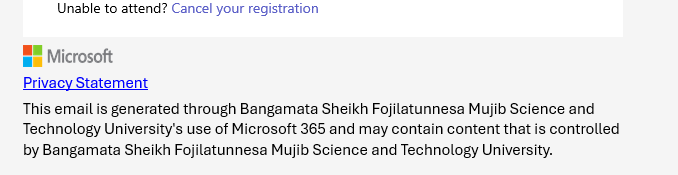
Despite the obvious typos, the email could easily slip past a busy executive scanning their inbox between meetings. The inclusion of a calendar invitation was particularly clever. Calendar fatigue is real — professionals accept, decline, and open meeting requests dozens of times a week. Embedding a phishing attempt in a familiar workflow lowers suspicion.
Image: Obvious typos

Why These Emails Still Work
Advanced phishing is less about flawless language and more about exploiting behaviour.
Attackers understand:
• People trust familiar brands like Microsoft.
• Users are conditioned to respond quickly to calendar invitations.
• Hybrid work environments rely heavily on collaboration tools.
• Urgency overrides caution.
The domain in this example is a good illustration. At a quick glance, “teams.mail.microsoft” appears legitimate because it contains trusted keywords. But legitimate Microsoft domains follow strict structures. Small deviations are often the giveaway.
Modern phishing campaigns frequently use:
• Lookalike or subdomain spoofing
• Compromised legitimate domains
• Multi-step credential harvesting pages
• OAuth abuse (Open Authorisation, a framework that allows applications to access user accounts without exposing passwords)
• MFA (Multi-Factor Authentication) fatigue attacks
In many cases, the email itself is only step one. The real objective is harvesting credentials or session tokens to bypass authentication controls entirely.
The Shift from Malware to Identity Compromise
Phishing today is primarily an identity attack. Rather than delivering malware attachments, many campaigns aim to capture login credentials or trigger authentication approvals.
Once an attacker has valid credentials, they often:
• Register their own device
• Establish mailbox forwarding rules
• Escalate privileges
• Move laterally across cloud environments
• Conduct business email compromise
This shift makes phishing a board-level risk. It’s no longer an “IT problem” — it’s an operational continuity issue.
What This Means
Traditional email filtering is no longer enough. Organisations need layered controls that address both technology and human behaviour:
1. Advanced email security with link detonation and real-time URL analysis
2. Domain monitoring and spoof detection
3. Conditional access policies that restrict risky sign-ins
4. Phishing-resistant MFA such as FIDO2 security keys
5. Continuous security awareness training that reflects real-world attack techniques
Equally important is fostering a culture where reporting suspicious emails is encouraged and frictionless. In my case, the phishing attempt was reported immediately. That simple action strengthens organisational awareness and improves detection patterns for others.
The Takeaway
Not all advanced phishing looks sophisticated. Some campaigns rely on urgency, brand impersonation, and workflow familiarity rather than technical perfection. Typos do not equal safety.
The email impersonating Microsoft with the suspicious “@teams.mail.microsoft” domain is a reminder that attackers only need one distracted moment.
In a landscape where identity is the new perimeter, vigilance — supported by modern controls — remains the strongest defence.
More from this months newsletter >

How to Get the Most Out of Your Security Provider
How to Get the Most Out of Your Security Provider A strong security provider can […]

Australian Data Breaches: Lessons from Recent Incidents
Lessons from April and May’s Australian Data Breaches April and May brought a noticeable increase […]
Spotlight Feature Devo: Real-Time Security Analytics
Spotlight Feature Devo: Real-Time Security Analytics Security leaders are facing mounting pressure with limited resources […]
Top 3 Cyber Events in Australia – February 2026
Top 3 Cyber Incidents in Australia – February 2026 February delivered another stark reminder that […]