

Now Available: The New & Improved SendSafely Outlook Add-in
The updated SendSafely Outlook add-in is now available for installation directly from Microsoft AppSource — and it’s built to perform better than ever.
Designed for the Outlook web-based platform, this new version works seamlessly across:
- Newer versions of Outlook for Windows and Mac
- Outlook Web App (Microsoft 365 and Outlook.com)
Built on a modern framework, the add-in delivers enhanced compatibility and functionality across platforms, ensuring a smoother and more reliable experience.
Configuring the add-in
To configure the add-in, browse to your inbox and compose a new email message. On the “Message” ribbon at the top of the screen you should see a section labeled “Apps”. Within that section you should have a SendSafely button.

After pressing the button, the SendSafely Task Pane will open on the right side of the screen. The Task Pane is the primary interface for interacting with SendSafely when composing a message.

The first time you load the SendSafely add-in you will need to log in with your SendSafely account by pressing the “Login to SendSafely” button on the Task Pane.
For SendSafely customers that are isolated to a specific region or have multiple SendSafely portals, it may be necessary to expand the “More Options” section of the login page to specify the hostname of the portal you want to connect to.

When you press the “Login to SendSafely” button, a new login window will open and load the login page for your SendSafely portal. If prompted to display a new window, choose the “Allow” option.
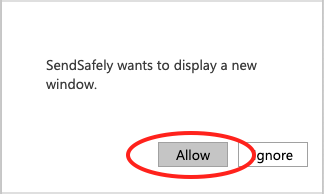
After you complete the login process, the login window will close and the plugin should display your login information at the bottom of the Task Pane.
After you complete the login process, the login window will close and the plugin should display your login information at the bottom of the Task Pane.

Please don't hesitate to contact us for more information on what the SendSafely encrypted file sharing platform can do. Click contact us below or email support@communicloud.com
More from this months newsletter:

How to Get the Most Out of Your Security Provider
How to Get the Most Out of Your Security Provider A strong security provider can […]

Australian Data Breaches: Lessons from Recent Incidents
Lessons from April and May’s Australian Data Breaches April and May brought a noticeable increase […]
Advanced Phishing Emails: Real-World Example and How to Stay Protected
Advanced Phishing Emails: Real-World Example and How to Stay Protected Phishing continues to be one […]
Spotlight Feature Devo: Real-Time Security Analytics
Spotlight Feature Devo: Real-Time Security Analytics Security leaders are facing mounting pressure with limited resources […]